01
Add your clients
Add a name and email address, then set the checklist for that Self Assessment return.
Name: James Wilson
Email: james@example.com
- Bank statements
- Expense receipts
- Rental income records
For independent UK accountants
Keep track of outstanding client tax records, prepare personalised reminders and send them through your own Outlook or Gmail — all from one simple dashboard.
RecordNudge keeps each client’s outstanding records, last reminder and next follow-up in one view. You prepare the email, then send it from Outlook or Gmail.
Often tracked in
Re: documents for the Self Assessment
The outstanding list is somewhere in the thread
Spreadsheet
James: receipts? · Sarah: not chased · Emma: done
Status, last reminder and next date in one row
Note
Rental income records were mentioned in March.
The next follow-up depends on finding that note
In RecordNudge
James’s reminder lists only the records still missing. You review it and send it yourself.
See which client records are still missing, without searching an email thread.
Client checklists, last reminders and next follow-up dates live in one list.
Draft an editable message that names only the items still outstanding.
Open the draft in Outlook or Gmail and send it from the account you already use.
You decide what to send, when to send it, and when a record is complete.
01
Add a name and email address, then set the checklist for that Self Assessment return.
Name: James Wilson
Email: james@example.com
02
Mark records as they arrive. See what is in, what is missing, and who needs attention.
James Wilson
03
Generate a message from the outstanding items only, then edit the subject and wording.
Not sent. To James Wilson.
Outstanding Self Assessment documents
Hi James,
Just a quick reminder that we're still waiting for:
- Expense receipts
- Rental income records
When you get a chance, could you please send these over?
04
Open the draft in Outlook or Gmail, send it yourself, then record the reminder and the next follow-up.
James Wilson
Not sent
To james@example.com
Outstanding Self Assessment documents
Open in Outlook and Open in Gmail. You review the draft and send it yourself, then record the reminder.
You review the draft and send it. Then mark the reminder as sent and set the next follow-up.
Add a fictional client, mark records received, and open a draft in Outlook or Gmail. The sample stays in this browser tab. Please don’t enter real client details.
Product film
A prepared walkthrough. It does not connect to a live account.
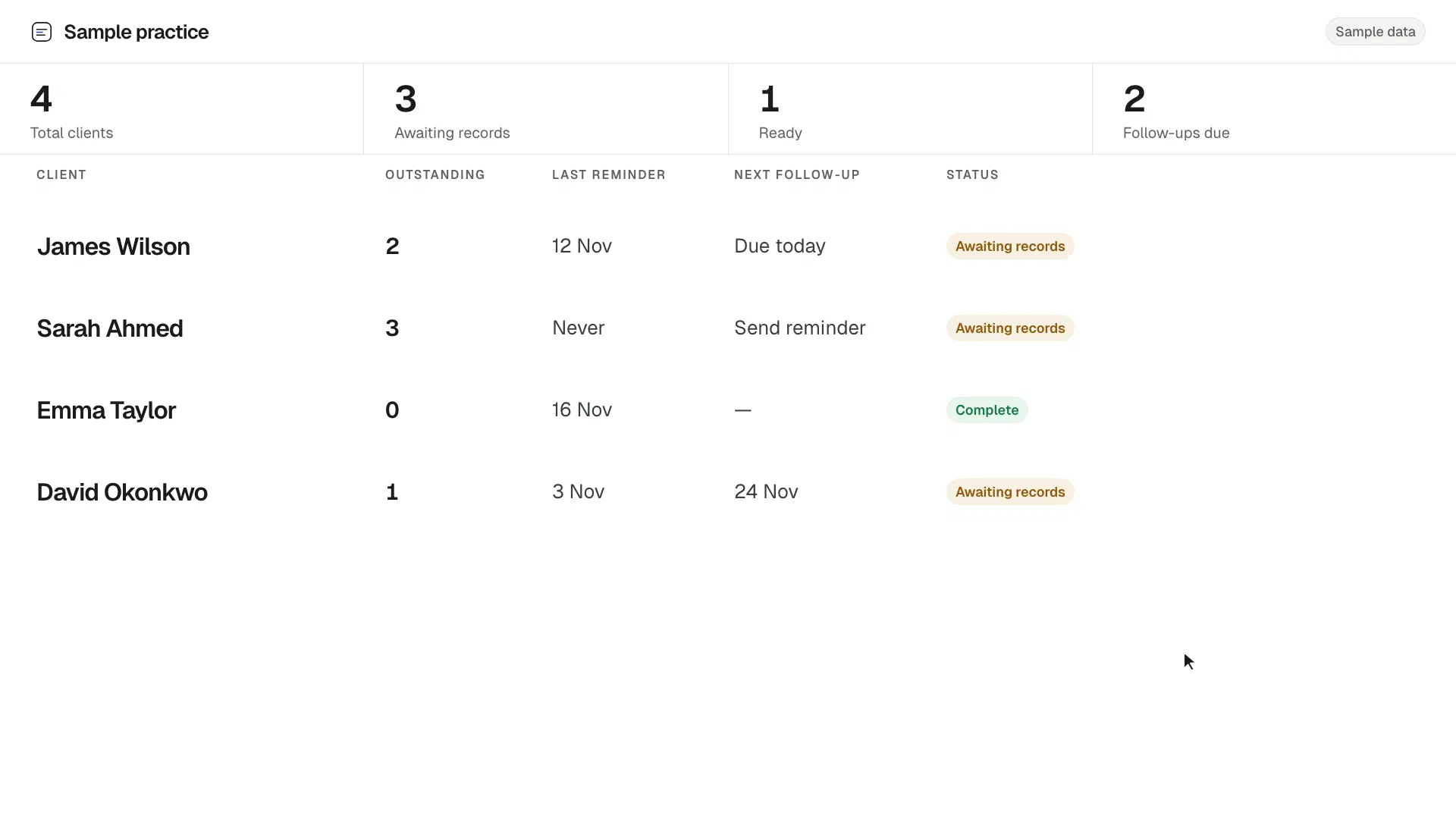
Sample practice
5
Total clients
3
Awaiting records
2
Ready
2
Follow-ups due
| Client | Outstanding | Last reminder | Next follow-up | Status |
|---|---|---|---|---|
| 2 | 12 Nov | Due today | Awaiting records | |
| 3 | Never | Send reminder | Awaiting records | |
| 0 | 16 Nov | — | Complete | |
| 1 | 3 Nov | 24 Nov | Awaiting records | |
| 0 | 9 Nov | — | Complete |
james@example.com
Last reminder12 Nov
Reminder history
A reminder will include only Expense receipts, Rental income records.
Fictional sample, kept in this browser tab only. Please don’t enter real client details. Opening Outlook or Gmail prepares a message. It does not send it.
See outstanding records, an editable reminder, and the handoff to Outlook or Gmail. You stay in control of sending.
Early-access prototype · No commitment required